Run one SQL script across hundreds of databases
Fleet query in Fleetdock 0.9.0 runs a SQL script on up to 500 MariaDB, MySQL or PostgreSQL databases and merges the results. How it works and when to use it.
Fleet query, new in Fleetdock 0.9.0, runs one SQL script on up to 500 databases and merges the results into a single table, with each row labeled by its database and server. It replaces the shell loop you write when you have one database per tenant and need to ask all of them the same question. Scripts that write get extra guardrails: a typed confirmation, a first run on a single database, and a stop at the first failure.
The problem: one question, many databases
If you run a database per customer, you know this request: "How many orders did each tenant take today?" The answer is one query, run everywhere. Usually that becomes a loop:
for db in $(mysql -N -e "SHOW DATABASES LIKE 'tenant\_%'"); do
  echo -n "$db: "
  mysql -N -e "SELECT COUNT(*) FROM orders WHERE created_at >= CURDATE()" "$db"
done
It works on one server. Then the tenants are spread over six servers, two of them PostgreSQL, and the loop grows: host lists and credentials, error handling, some parallelism, output you can paste into a spreadsheet. The script ends up in someone's home directory, with no record of who ran what where.
For reads this is tedious. For writes, such as a data fix on every tenant, it is risky.
How fleet query works
The Fleet query page has three steps.
1. Write the script. It can contain several statements, the same as in the SQL console.
2. Pick the databases. Filter by name (a pattern like shop_*), server and engine, then
select everything shown or tick databases one by one. Up to 500 per run. If the selection mixes
engines, Fleetdock warns you, because the script has to work on each of them.
3. Set the limits and run. You choose how many databases run at once (1 to 16), the timeout per database (up to 600 seconds) and how many rows to keep from each (up to 1000).
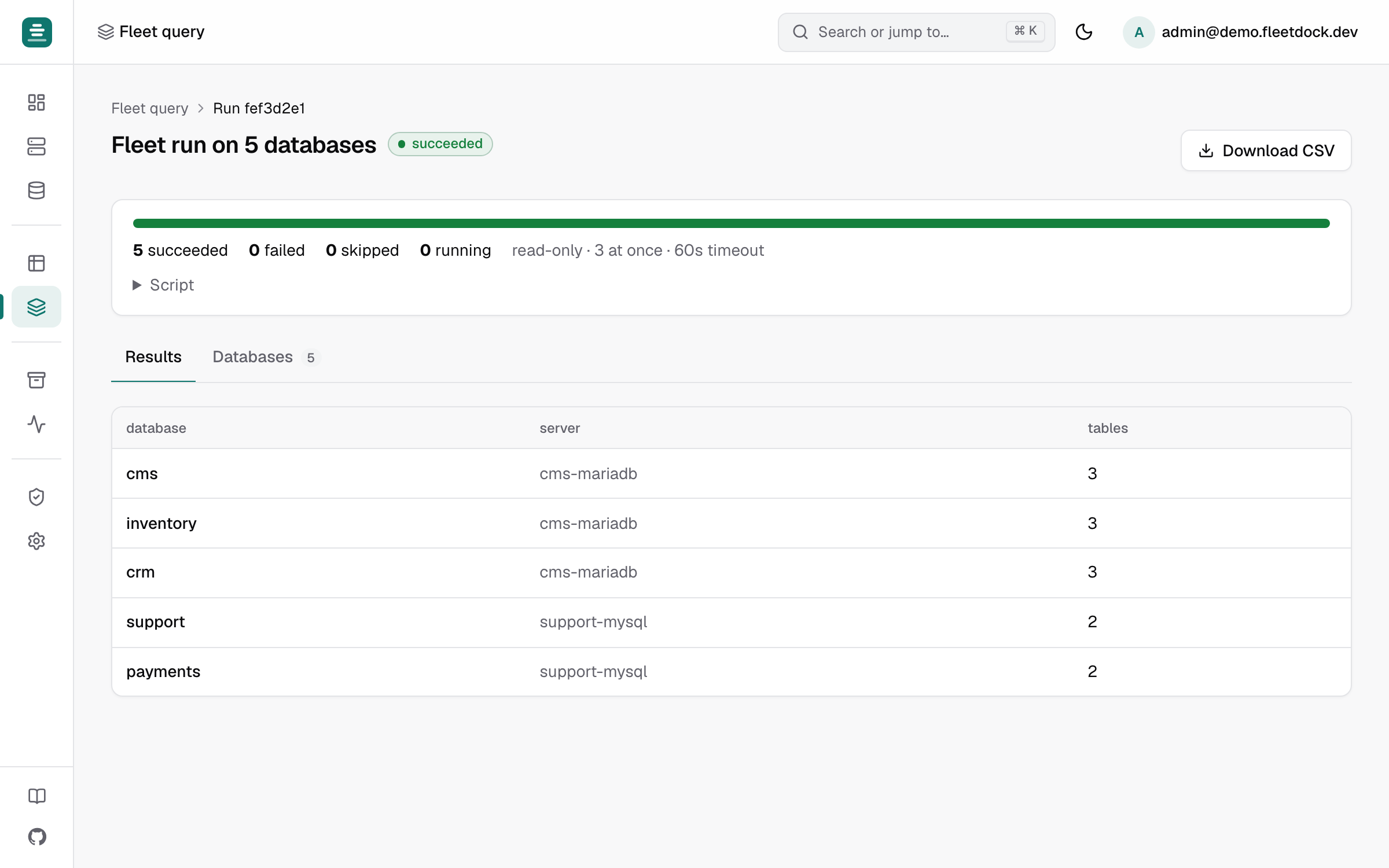
The run continues in the background. You can close the tab and come back to it later from Your recent runs. Two views show the results:
- Results: the merged rows, with the database and server in front. When a script has several statements, this is the first result set from each database.
- Databases: the status of each database, with rows returned or changed, time taken and any error.
CSV downloads the merged table.
If a run goes wrong, Cancel skips the databases that haven't started and kills the statements still running on their servers. Retry re-runs only the databases that didn't succeed. If the Fleetdock process stops in the middle of a database, that database is marked unknown, because the script may or may not have completed there. Fleetdock never re-runs it on its own: you check it, then retry.
Guardrails for scripts that write
A script with any write statement is handled differently:
- You confirm by typing
run on N, where N is the number of databases. - The first database runs alone, then the run waits. You check the result on that one database, then choose Continue on the other N or Cancel. This is on by default.
- The run stops at the first failure. Databases that haven't started yet are skipped. Also on by default.
Nothing is rolled back for you. If a write succeeds on 120 databases and fails on the 121st, the first 120 keep the change. Write scripts that are safe to run twice, and test them first.
Permissions
Fleet query uses the same access rules as the SQL console, per database: database:read to read,
database:write if the script writes, and instance:write for system databases or instances
browsed with their admin login. Fleetdock checks this when the run starts and again just before
each database runs. If your access is removed or your account is suspended halfway through, the
remaining databases are skipped.
A run is visible only to the user who started it. Finished runs are kept for 30 days by default
(FLEETDOCK_FLEET_RUN_RETENTION). FLEETDOCK_FLEET_MAX_PARALLEL (16 by default) caps how many
databases one Fleetdock process works on at once, across all runs.
Use cases
Find the tenants with X
The simplest and most common use: a read that tells you where something is true. Which tenants have a column, a table, a setting, a feature flag turned on?
On MySQL and MariaDB:
SELECT COUNT(*) AS has_plan_column
FROM information_schema.columns
WHERE table_schema = DATABASE()
  AND table_name = 'accounts'
  AND column_name = 'plan';
On PostgreSQL, replace DATABASE() with current_schema(). Sort the merged result by
has_plan_column and you have the list of tenants that still need a migration.
The same pattern answers business questions: orders today per shop, active users per tenant. Download the CSV and you're done.
If you only need to know which databases contain a table or column, Ctrl/Cmd+K in the dashboard already searches table and column names across every database you can open. Fleet query is for when you need to run SQL.
Check the schema version everywhere
If your migration tool records applied migrations in a table, ask every tenant for its latest version:
SELECT MAX(version) AS schema_version FROM schema_migrations;Adjust the table and column to your tool. A tenant that's behind stands out in the merged results. A read-only run doesn't stop at the first failure, so a tenant where the table is missing shows up with its error under Databases while the others complete.
For structural differences that a version number doesn't capture, such as an index added by hand on one tenant, use schema history. Compare with… diffs two databases on the same engine and writes the DDL that aligns them.
Data fixes, previewed first
Say a bug wrote NULL into invoices.currency for some customers, and the fix is an UPDATE.
A careful sequence:
-
Preview on one database. Open a tenant in the SQL console and use Preview. The script runs in a transaction that is always rolled back, and you see how many rows each statement would change, plus up to 20 rows before and after for a single-table
UPDATEorDELETE. -
Count the damage across the fleet. Run the read version as a fleet query:
SELECT COUNT(*) AS affected FROM invoices WHERE currency IS NULL; -
Run the fix as a fleet query, written so a second run does nothing:
UPDATE invoices SET currency = 'EUR' WHERE currency IS NULL;Keep run the first database alone on. Check that database, then continue.
-
Run the count again. Every database should report zero.
Preview has limits. It really executes the statements before rolling them back, so triggers fire
and AUTO_INCREMENT and sequence counters advance. It refuses DDL, and on MySQL and MariaDB it
refuses databases with MyISAM, Aria or MEMORY tables, whose changes can't be rolled back.
From the API
The same is available through the API, for scheduled checks or CI:
curl -X POST https://fleetdock.example.com/v1/fleet-runs \
  -H "Authorization: Bearer $FLEETDOCK_TOKEN" \
  -H "Content-Type: application/json" \
  -d '{
    "sql": "SELECT MAX(version) AS schema_version FROM schema_migrations",
    "database_ids": ["…"],
    "concurrency": 8,
    "timeout_seconds": 60,
    "row_limit": 10
  }'
Follow the run with GET /v1/fleet-runs/{id} and GET /v1/fleet-runs/{id}/targets, or download
GET /v1/fleet-runs/{id}/results.csv. A run started with a scoped API token runs with that token's
scopes. The request also takes stop_on_error and canary, which default to on for scripts that
write and off for reads. See the
API reference for the full schema.
Try it
Fleet query ships in Fleetdock 0.9.0. If you're running a database per tenant, the database-per-tenant guide covers the rest of the setup: discovery, scheduled backups, and moving tenants between servers. To get started, see Getting started, and the fleet query docs for the details.